> ## Documentation Index
> Fetch the complete documentation index at: https://hanabiaiinc-docs-platform-create-voice.mintlify.site/llms.txt
> Use this file to discover all available pages before exploring further.
# Voice Design
> Generate a custom voice from a text description in the Fish Audio web app
Voice Design turns a written description into an AI voice. You write a prompt, generate a
couple of samples, pick your favorite, then add a few details and save. It is the fastest way
to make an original voice — best for characters rather than cloning a real person.
To clone a real, verified voice at studio quality instead, see [Professional Voice
Clone](/overview/platform/create-voice/professional-voice-clone).
## Before you begin
* **Sign in** at [fish.audio/app](https://fish.audio/app).
* **Credits.** Each generation costs credits (or is free during a promotion — the cost is
shown next to the **Generate Samples** button).
## Open Voice Design
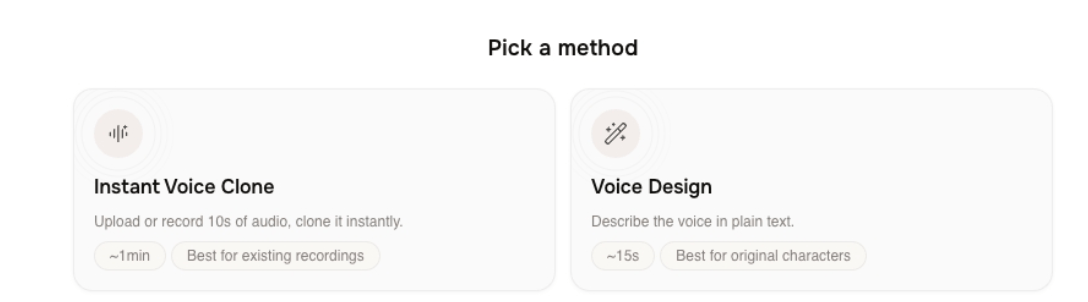
Go to [fish.audio/app/create-voice](https://fish.audio/app/create-voice) and, under **Pick a
method**, choose **Voice Design**.
 ## Create the voice
Under **Describe the voice you want**, type one or two specific sentences — for example,
*"A warm, slightly raspy middle-aged narrator with a soft American accent. Calm, deliberate
pace, great for late-night audiobooks."* Your description must be between 20 and 1000
characters.
To start faster, click a starter prompt such as **Warm late-night radio host**,
**Documentary narrator**, or **Children's storyteller**. To control exactly what the
samples say, click **Set preview text** and enter a short line (5–150 characters);
otherwise Fish Audio writes a sample for you.
Check the cost note (for example, **2000 credits per generation**, or **Free for a limited
time** during a promotion), then click **Generate Samples**.
*Screenshot: the description box, starter prompts, and the Generate button.*
When generation finishes, the **Pick a voice** section shows two samples. Click **play** on
a card to listen, and click the **waveform** to jump to a spot. Not happy with either?
Click **Re-generate Samples** for a new pair.
Click **Select** on the sample you want — it changes to **Selected** — then click
**Continue**.
*Screenshot: the two sample cards with one Selected and Continue enabled.*
On the **Voice Details** screen, a preview card updates as you fill in the form:
* **Voice Name** (required).
* **Cover**, **Description**, **Use Cases**, and **Voice Style** (optional — some are
pre-filled from the sample).
* **Gender** (Female, Male, or Neutral) and **Age** (Young, Middle-Aged, or Elderly).
* **Type** — visibility: **Public** (shown in discovery), **Unlisted** (shareable by
link), or **Private** (only you). On the free tier, Unlisted and Private are locked with
an upgrade hint.
Tick the confirmation box (*"I confirm this voice does not impersonate a real, identifiable
person and complies with Fish Audio's usage policy."*), then click **Create Voice**. Your
voice is saved and you land on **My Voices**.
*Screenshot: the Voice Details form with the visibility options and confirmation box.*
## Next steps
Clone a real, verified voice at studio quality.
Find, edit, and use the voices you have created.
## Create the voice
Under **Describe the voice you want**, type one or two specific sentences — for example,
*"A warm, slightly raspy middle-aged narrator with a soft American accent. Calm, deliberate
pace, great for late-night audiobooks."* Your description must be between 20 and 1000
characters.
To start faster, click a starter prompt such as **Warm late-night radio host**,
**Documentary narrator**, or **Children's storyteller**. To control exactly what the
samples say, click **Set preview text** and enter a short line (5–150 characters);
otherwise Fish Audio writes a sample for you.
Check the cost note (for example, **2000 credits per generation**, or **Free for a limited
time** during a promotion), then click **Generate Samples**.
*Screenshot: the description box, starter prompts, and the Generate button.*
When generation finishes, the **Pick a voice** section shows two samples. Click **play** on
a card to listen, and click the **waveform** to jump to a spot. Not happy with either?
Click **Re-generate Samples** for a new pair.
Click **Select** on the sample you want — it changes to **Selected** — then click
**Continue**.
*Screenshot: the two sample cards with one Selected and Continue enabled.*
On the **Voice Details** screen, a preview card updates as you fill in the form:
* **Voice Name** (required).
* **Cover**, **Description**, **Use Cases**, and **Voice Style** (optional — some are
pre-filled from the sample).
* **Gender** (Female, Male, or Neutral) and **Age** (Young, Middle-Aged, or Elderly).
* **Type** — visibility: **Public** (shown in discovery), **Unlisted** (shareable by
link), or **Private** (only you). On the free tier, Unlisted and Private are locked with
an upgrade hint.
Tick the confirmation box (*"I confirm this voice does not impersonate a real, identifiable
person and complies with Fish Audio's usage policy."*), then click **Create Voice**. Your
voice is saved and you land on **My Voices**.
*Screenshot: the Voice Details form with the visibility options and confirmation box.*
## Next steps
Clone a real, verified voice at studio quality.
Find, edit, and use the voices you have created.